
iPhone Storage Full? Turn Off These 2 Settings Right Now
Let’s be real — there’s nothing more frustrating than that dreaded “iPhone Storage Almost Full” notification popping up at the worst possible moment. Before you know it, you’re scrambling to delete old texts, uninstalling apps you actually use, and desperately trying to buy yourself a few more megabytes. Sound familiar?
Here’s the good news: you don’t have to go through all that chaos. There are a couple of simple settings hiding in your iPhone right now that could be quietly eating up your storage without you even realizing it. Here’s exactly what to turn off — and how to do it.
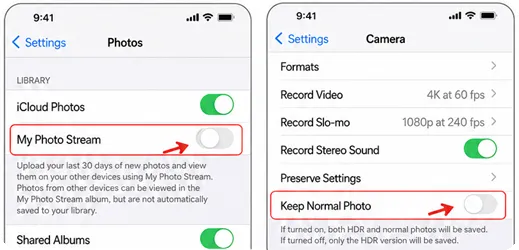
1. Turn Off My Photo Stream — Seriously, Do It Now
The number one culprit? My Photo Stream. According to Steve Flores, an Information Technology Engineer at Technology Solutions, this feature is a silent storage killer. “It uses up a lot of free storage because it duplicates your pictures from the last 30 days and syncs them across all your Apple devices,” he explains. Translation: your iPhone is holding onto extra copies of photos you probably don’t even know exist.
Turning it off stops your phone from saving those duplicate images. Just keep in mind that when you delete those photos, they’ll be removed from your other Apple devices that are synced up too.
How to turn it off: Head to Settings > Photos, then toggle off My Photo Stream. That’s it.
2. Stop Saving Both HDR and Normal Photos
Here’s another one most people overlook. Jamie Knight, CEO of Data Source Hub, points out that iPhones are set up to save two versions of every photo you take — the regular version and the HDR version. “Saving both photos will consume a lot of storage,” Knight says. And honestly? You probably don’t need both sitting on your phone.
Switching to HDR-only means you still get the better-quality shot without doubling up on space every single time you snap a picture.
How to turn it off: Go to Settings > Camera, then switch off Keep Normal Photo.
Two small tweaks, zero stress. Make these changes today and you’ll be amazed at how much storage you can reclaim — no app-deleting panic required.